AI Voice Producer Tag Generator
Create custom producer tags and professional voice tags in seconds. Type your phrase, choose an AI voice, add studio-quality effects, and download your finished tag as MP3 or WAV.
Perfect for:
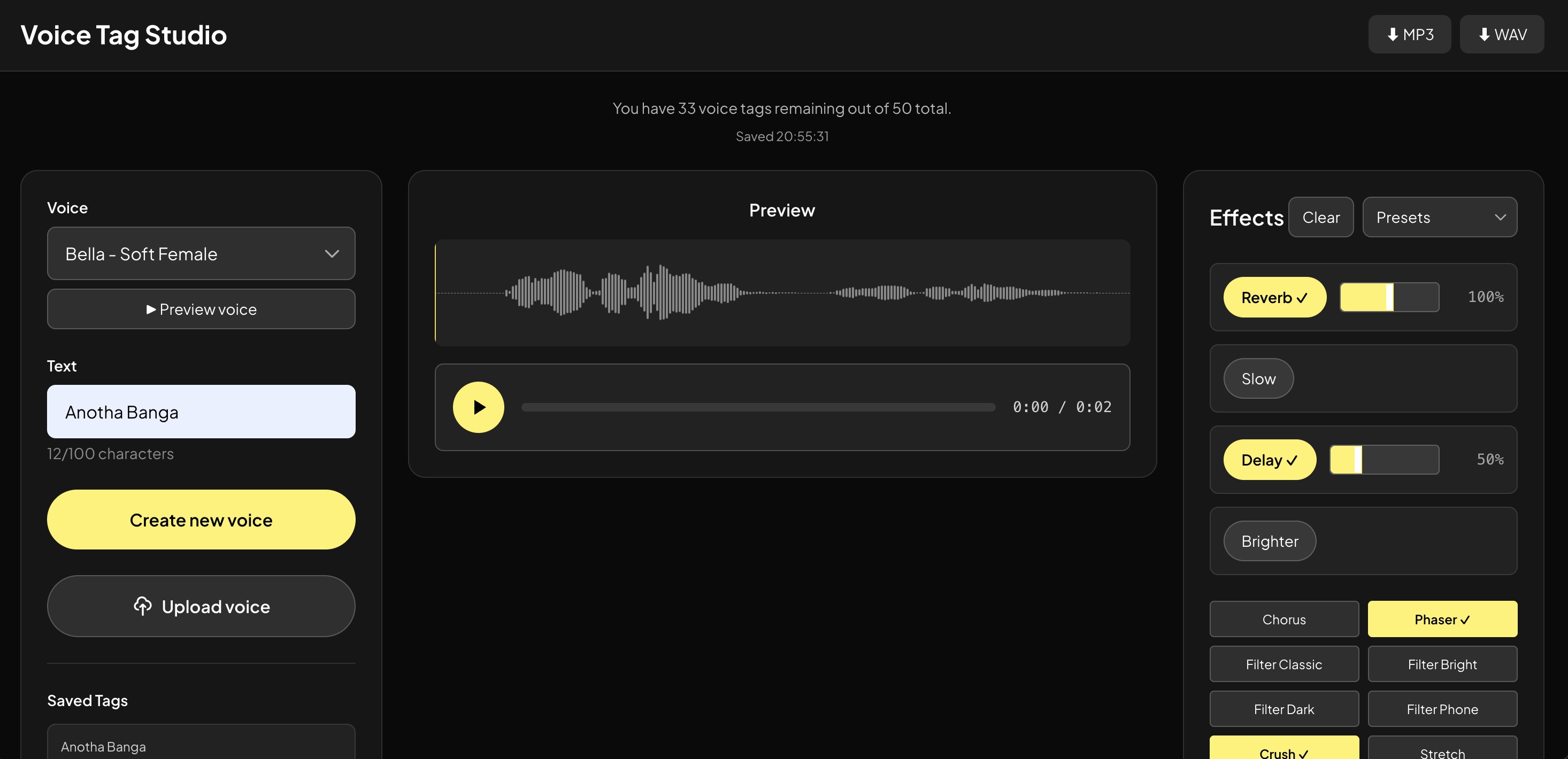
How to Make a Producer Tag with Wavsly
Enter Your Name or Phrase
Type what your tag should say. One to three seconds works best.
Choose an AI Voice
Pick from 25+ premium voices and preview before you generate.
Add Voice Effects
Reverb, delay, chorus, phaser — from a preset or your own settings.
Preview and Download
Grab your tag as MP3, or WAV on Pro and Premium.
Everything You Need to Create Custom Voice Tags
Premium AI Voices
25+ pro voices. Preview before you generate.
Full FX Library
Reverb, delay, chorus, phaser, filter and pitch — or one-click presets.
Instant Results
Type it, hear it, download it. No mic, no studio, no waiting.
MP3 + WAV
MP3 on every package, uncompressed WAV on Pro and Premium.
Dry + Processed
Keep the raw voice and the effected tag so you can re-shape it later.
Royalty-Free
Use your tag in beats, releases, videos, streams and podcasts. Forever.
Examples
Simple Pricing
No subscription. Just a one-time payment for the package you need.
Basic
Perfect for trying out voice tags
- 10 high-quality voice tags
- 8 premium voice models
- Full FX library
- Basic presets
- MP3 downloads
- Royalty-free license
Pro
Great value for finding your perfect tag
- 25 high-quality voice tags
- All voice models (25+ options)
- Full FX library
- All presets
- MP3 + WAV downloads
- Royalty-free license
Premium
For producers with multiple projects
- 50 high-quality voice tags
- All voice models (25+ options)
- Full FX library
- All presets
- MP3 + WAV downloads
- Royalty-free license
Frequently Asked Questions
A producer tag is a short audio signature — usually your name, alias, or a catch phrase — placed at the start of a beat or dropped into a track. It tells listeners who made the music and helps protect beats you share or lease. It is also called a voice tag, beat tag, or producer drop.
You type the phrase you want, choose one of our premium AI voices, and Wavsly generates the audio for you. From there you can add effects, preview the result, and download the finished tag. No recording session is involved.
Your voice tags are generated instantly. After purchase you can create your tags immediately and download them in seconds, instead of waiting days for a custom recording.
Yes. Choose from our premium voice models, then shape the sound with the full FX library, including reverb, delay, chorus, phaser, filter, pitch and more. You can start from a preset or adjust every parameter yourself.
MP3 downloads are included on every package. WAV downloads are included on the Pro and Premium packages for producers who want an uncompressed file to drop into their DAW.
Yes. Every tag you generate comes with a royalty-free license, so there are no recurring fees or per-release payments once you have created it.
Yes. You can use your tags in commercial projects such as beats, songs, releases, YouTube videos, streams, and podcasts.
No. Everything happens in your browser. You do not need a microphone, a voice actor, or a studio — only the phrase you want your tag to say.
The dry version is the raw generated voice with no effects applied. The processed version is the same recording after reverb, delay, or other effects are added. Keeping both gives you a clean file to re-process later and a finished tag you can use right away.
Yes. The same studio works for DJ drops, radio idents, podcast intros and outros, stream alerts, and audio hooks for social video.
Most producer tags are one to three seconds long. Short tags are easier to place under a beat without covering the music, and they are easier for listeners to remember.
Most producers use their name or alias, sometimes with a short phrase such as "on the beat" or "turn it up". Pick wording that is easy to say, easy to hear over a mix, and consistent across every release.